How to review an AI-built website before launch
The practical answer
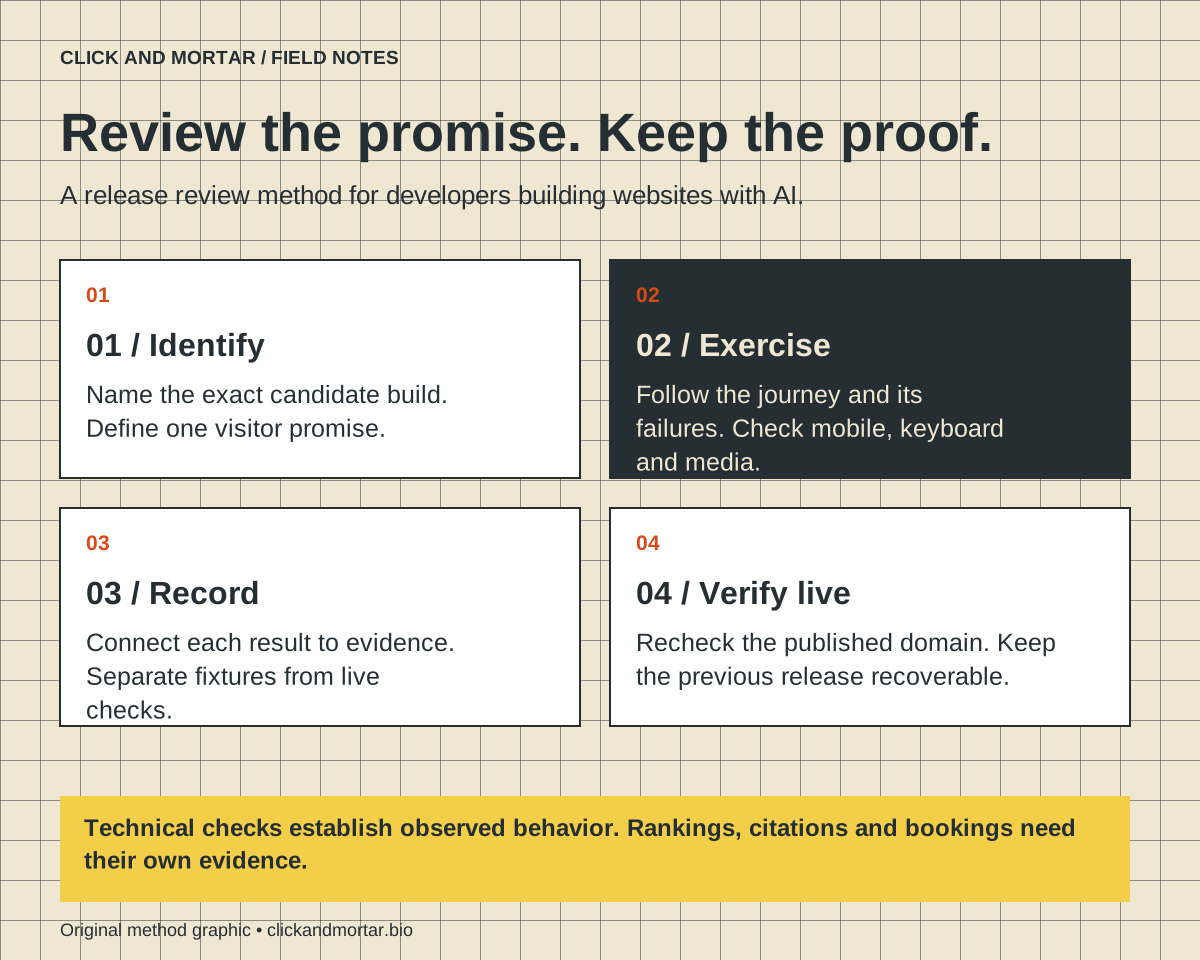
Review the website as a set of promises a visitor must be able to rely on. Check the facts, follow each important journey, exercise failure states, and inspect the actual production build. Record evidence for each result and repeat the affected checks after a fix. A convincing preview is the beginning of review, not its completion.
This method draws on our Click and Mortar work: restoring a usable booking destination, correcting a mobile animation fallback, serving readable article HTML without JavaScript, and checking every public route after an editorial release. Those are bounded implementation observations, not proof of increased conversions or a comprehensive security or accessibility assessment.
Start with a release you can identify
Before our Field Notes updates go live, we package a checked build and record its deployment. That detail matters because a local preview, an uploaded build, and the custom domain can show different versions. If you review one version and publish another, your screenshots and test results no longer describe what visitors receive.
Create a short release record before asking a coding tool to fix anything: preview URL, intended production domain, source revision or snapshot, included change, and previous working deployment. In a shared project, identify which uncommitted changes belong to this release. Do not let a request to publish an article silently become permission to publish an unfinished redesign.
Write the visitor promise in one sentence. For a service site it might be: a mobile visitor can understand the offer and reach an available consultation. For a developer blog it might be: a reader can find a method, read it without optional media, and follow its references. This becomes the organizing question for the review.
Check the claims before polishing the pixels
Copy review should start with names, service descriptions, prices, contact details, image captions and proof claims. Trace each consequential statement to an approved source. A plausible testimonial generated to fill a layout is still an unsupported testimonial. The same applies to logos that imply a client relationship or a case study that suggests authorship you cannot establish.
Make an evidence table with three states: verified, illustrative, and unresolved. A fictional calculation can stay if it is clearly an example. An unresolved claim about a real business should be removed or confirmed before publication. Ask the coding tool to identify gaps, but inspect its cited evidence yourself.
For this studio, the public booking destination and the implementation artifacts support narrow statements about what we checked. They do not support claims that the site increased bookings. Keeping those boundaries visible makes the guide more useful to someone comparing methods and deciding what they can reproduce.
Follow the journey beyond the button
Open the candidate at a narrow viewport, enter through a normal navigation link, and follow its main action. Try keyboard navigation too. Record the exact point where the action ends: destination opened, appointment times displayed, form stored, provider accepted a message, or confirmation received. These are separate observations.
Our calendar lesson was simple: a link could be present while its destination was unavailable. Later inspection established that public dates and time slots were visible. It did not establish that an appointment had been booked. Similarly, a local test that replaces a calendar with a fixture checks our interface contract; it cannot prove the external calendar is healthy.
Use controlled fixtures for repeatable automated tests of your own behavior. Playwright recommends testing user-visible behavior and isolating third-party dependencies. Pair that with a bounded live check of the real integration when appropriate. Do not create real purchases, send test messages to unsuspecting recipients, or book appointments merely to make a checklist green.
| What you observed | What you can claim |
|---|---|
| Booking link opens | The destination is reachable |
| Available times appear | Public scheduling availability was visible |
| Form request is stored | The submission persisted |
| Email provider accepts a request | The provider accepted it; inbox delivery is unproven |
| A fixture-based test passes | The controlled interface behavior passed |
References: Playwright: Best practices
Make one dependency fail on purpose
Choose the dependency most likely to undermine the visitor promise: optional video, a form endpoint, or an external scheduler. In a local or staging test, block that request or return a controlled failure. Check whether the visitor gets a useful next step, whether entered information survives where appropriate, and whether the page falsely announces success.
For media-heavy pages, inspect the end state with the asset unavailable and with reduced motion enabled. Our mobile selection effect needed an image-animation fallback because the video path could expose an unwanted background. Narrowing a desktop window alone is insufficient evidence of the same media behavior on a phone; check the input and device conditions involved.
Write a reproducible defect report: route, environment, trigger, expected behavior, actual behavior and evidence. For example, “On the mobile article page, block the optional video request; the reading area should remain usable.” This illustrative test is easier to repair than “make mobile better.” Change one cause, then repeat the original failing steps.
Review reading, focus and layout
Use the W3C accessibility checks as an initial review of titles, headings, image alternatives, labels, visible focus, contrast and zoom. They are a starting point; passing them does not establish full accessibility. Inspect the actual text and controls rather than treating the presence of an attribute as sufficient.
On the candidate, move through the menu and main action with a keyboard. Enlarge the page and inspect whether text or controls become hidden. Read the method without playing a video. A diagram should have an adjacent explanation, and a screenshot should be legible enough to support the step it illustrates.
For Field Notes, our browser checks open articles with JavaScript disabled and verify that the body and method image remain available. That check addresses this publication’s reading promise. An application that fundamentally needs JavaScript requires a different failure experience; copying our test without considering the product would miss the point.
References: W3C WAI: Easy Checks, a first accessibility review
Check crawlability, then measure visibility separately
Inspect the production-style HTML, response status, canonical URL, page title and description. Verify that the sitemap contains the intended public page, internal links reach it, and a made-up URL returns a genuine missing-page response. Check the whole public route inventory after a release, because a shared navigation or routing change can affect older pages.
Google says its existing SEO foundations apply to AI Overviews and AI Mode: important information should be available as text, pages should be discoverable through links, and structured data should agree with visible content. Eligibility does not guarantee crawling, indexing or selection as a source. A special AI file is not a substitute for a useful, accessible page.
Our release audit verifies technical conditions. Separately, use actual Search Console metrics to observe impressions and clicks, and record AI referrals and visibly linked citations as different evidence. Do not turn a passing local audit into a ranking claim. A launch record should say which reports are pending rather than filling missing measurements with zero.
References: Google Search Central: AI features and your website
Finish with a small evidence log
Keep the release decision readable enough that another developer can understand it without replaying the entire chat. Each row should connect a visitor promise to a check, the observed result, and any remaining limit. Store screenshots or logs where the project owner can find them, without credentials or private submission data.
Use this prompt for a bounded review: “Inspect this candidate release against the visitor promise. Report each defect with its route, reproduction steps, impact and evidence. Separate observed failures from untested risks. Fix only the agreed release scope, rerun affected checks, and identify any difference between the reviewed build and production.” Supply the actual scope and environment with the prompt.
After publication, repeat the critical journey on the custom domain and verify that the new assets load. Keep the previous deployment available for recovery. If the live check fails, record the failure and repair or roll back within the approved scope. The finish line is an identified release with evidence about what works and an honest account of what remains unknown.
| Release log field | Example entry to adapt |
|---|---|
| Promise | Reader can read the method and open its sources |
| Environment | Candidate build; narrow viewport; JavaScript disabled |
| Check | Open article through the index; inspect body and graphic |
| Evidence | Dated result plus screenshot or test output |
| Limit | Does not establish indexing or accessibility conformance |
| Recovery | Previous working deployment and responsible owner |
Common questions
Can I ask the same AI tool that built the site to review it?
Yes, but give it explicit acceptance criteria and require observed evidence. A second confident description of the code is not a browser check. Inspect important results yourself and use independent tests where the consequences justify them.
Do I need an automated test for every visual change?
Use proportionate checks. A copy adjustment may need a visual inspection and content validation. A booking or form change needs evidence about the affected behavior. Keep repeatable tests for important journeys and known failure modes.
Does passing this checklist mean the site is secure?
No. This is a release review method. Authentication, authorization, sensitive data, payments and other higher-risk features require focused checks appropriate to their architecture and use.
Sources and further reading
Primary references checked on September 14, 2026. Product claims belong to the cited provider; implementation recommendations reflect our judgment.
Field Notes / for developers
The next lesson, in your inbox.
A short, practical blurb for every new note, with a link to the full method. Web development, useful motion, automation, and lessons from AI-assisted builds. Up to three emails a week.
Developer notes, no sales sequence. Privacy · Prefer RSS?
Learn by building / with Tommy
Want a hand getting started?
If you want to get into AI web design or get better at vibe coding, I’d love to help you get started at no charge. Bring a project, a stuck prompt, or a question. I find I learn more by teaching others.
Book a free 30-minute learning callA practical conversation. No experience required.
AI assists research and drafting. Articles are checked for source support and clear distinctions between examples and verified work. Read our editorial policy. Suggest a correction.