
Higgsfield for websites: what works and what needs code
The practical answer
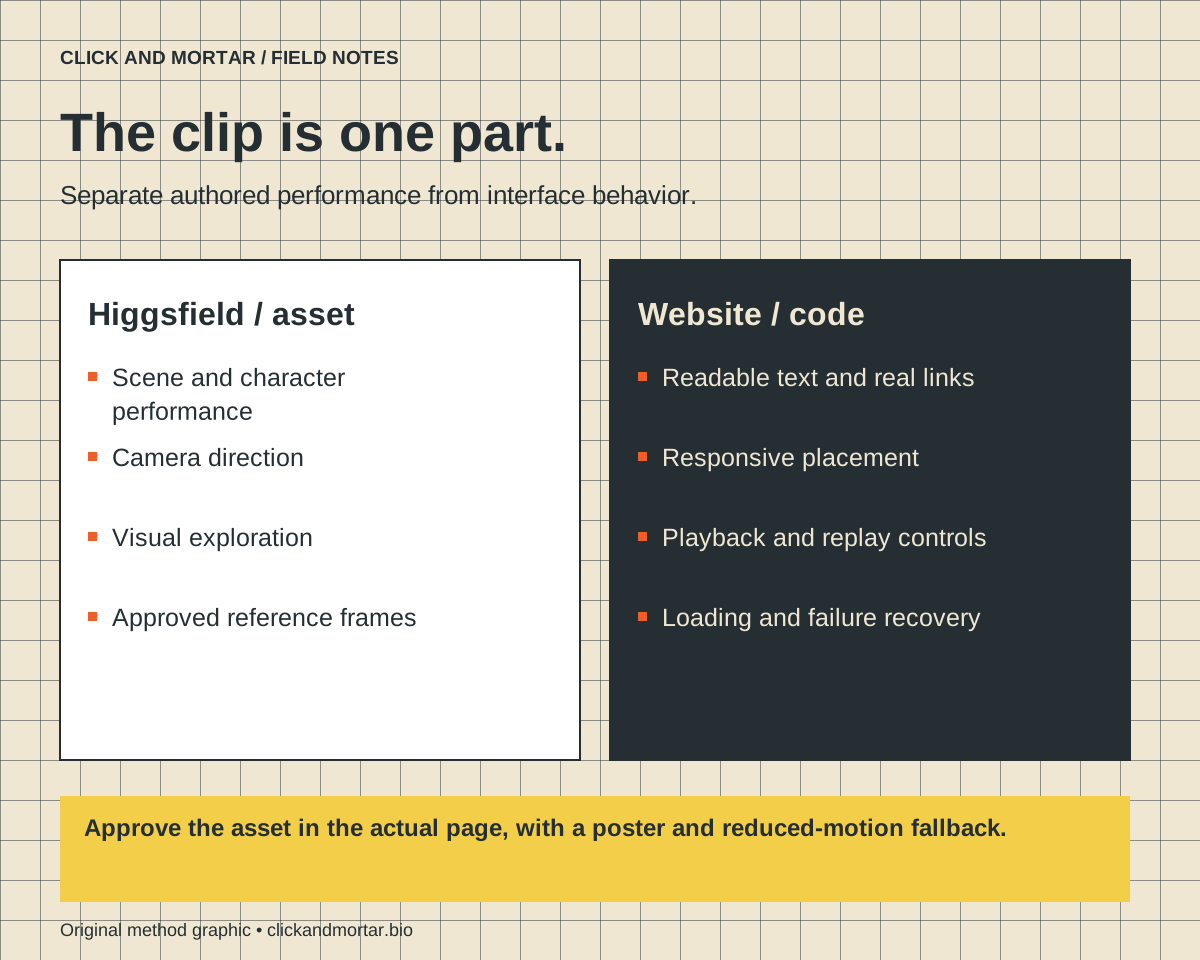
Use Higgsfield to produce and explore visual assets such as a short brand scene or character performance. Use website code for layout, text, navigation, playback, and accessible controls. Evaluate the exported asset in its real page placement before treating it as finished.
Drawn from our Click and Mortar asset and homepage experiments, including authored clips, static frames, and playback integration. Product descriptions are attributed to Higgsfield; the workflow recommendations are our editorial judgment rather than a benchmark across every model.
Think of Higgsfield as part of production
This note focuses on integrating Higgsfield-generated media into a website. Higgsfield also documents a separate website-building workflow through its Supercomputer agent. That broader capability does not change the boundary discussed here: a generated video is a media asset, while responsive layout, navigation, forms, and accessibility depend on the site's implementation. We have not benchmarked that website builder in this article.
The useful question is not whether an AI video tool can build a website. It is which part of the website's production it can improve. In our work, a generated asset can supply a short visual performance while the application supplies the behavior around it. That division makes both sides easier to inspect and replace.
A homepage scene has a particular space, message, and duration. It may need to hold a clean final frame while a visitor reads beside it. An interesting standalone movie can fail those requirements. Start with the placement and the visitor's task, then decide whether a generated clip belongs there.
This distinction also protects maintenance. If a service name changes, the editor should be able to change real text. If the layout changes, the video should not be the only place where the message exists.
References: Higgsfield: Build a website with AI (published August 9, 2026; checked September 10, 2026)
Where it can be useful
Higgsfield describes Cinema Studio as an environment built around cinematic controls and interchangeable video models. Its August 12, 2026 product retrospective explains the camera, optics, and focal-length approach, while also describing the experimentation behind it. That is a first-party description, not independent proof that every generated shot will be consistent.
For a website team, the useful applications are exploring a visual direction, producing an authored scene, and finding a character or camera performance that fits the brand. Keep the assignment bounded: one action, a clear composition, and enough space for the website's real content.
A construction worker inspecting a frame can support a page about quality checks. The same clip is less useful if it obscures the evidence the visitor came to read. Relevance comes from the brief and placement, not from the generation tool's name.
References: Higgsfield: How we built Cinema Studio (August 12, 2026); Higgsfield: Camera movement guide
What should stay outside the generated video
Keep exact copy, navigation, prices, form feedback, and clickable elements in the application. These details need to remain correct across screen sizes, interaction states, and future edits. Treat generated text or geometry as something to inspect, not as a dependable content-management system.
Do not confuse creative camera control with deterministic interface control. A video model can produce a compelling movement, but your application still has to decide when the visitor sees it, what happens after playback, and how the page behaves if playback never starts.
Preserve a static fallback and the source assets. A version that looks good in a full-screen player may have a poor crop on a phone. Retaining the original and approved variants makes it possible to adjust the integration without regenerating from memory.
| Use generated media for | Use code for |
|---|---|
| Character or scene performance | Real labels, buttons, and links |
| Visual exploration | Responsive layout and content hierarchy |
| Authored camera movement | Viewport triggers and playback state |
| Decorative atmosphere | Focus, reduced motion, and failure recovery |
Use a small acceptance brief before generating
Specify the subject, one action, camera behavior, start and end composition, and intended crop. Include the required still state. Keep important labels out of the generation and note where website text will sit. When possible, establish approved reference frames so the visual direction has something concrete to match.
Review a candidate against the brief before requesting another variation. Look for distracting background changes, unreadable marks, unintended actions, and a final frame that cannot support the planned layout. Separate a creative mismatch from an export or website integration problem; each needs a different fix.
Do not chase a perfect generation to solve a problem that belongs in code. If a clip is correct but starts too early, change the trigger. If the layout is wrong, change the container. If the action is wrong, revise the asset or its brief.
- One clear purpose and action.
- An approved crop for desktop and mobile.
- A useful poster and completed state.
- No essential claim or instruction available only inside the video.
- A defined playback and failure behavior on the actual page.
The deliverable is the integrated page
After selecting an asset, inspect its dimensions and export settings, place it in the actual page, and test playback on the target devices. Avoid downloading every clip before the visitor reaches it. A still poster should make the section understandable while the asset loads.
Test reduced motion, a failed media request, repeated navigation, and a visitor arriving halfway down the page. Verify that the essential message and next step still work. These checks turn a creative asset into a usable website element.
Higgsfield features and model options change. Before choosing a specific model for a new project, verify the current inputs, output format, duration limits, and cost in the product. Our stable recommendation is to keep the asset replaceable and the website behavior under your control.
References: web.dev: Lazy loading video
Common questions
Can Higgsfield replace frontend development?
Higgsfield documents a website-building workflow through Supercomputer as well as media-generation tools. This article evaluates generated-media integration, not that builder. A clip alone does not supply responsive layout, accessible controls, routing, or form logic; those still need implementation and verification in the resulting site.
Which Higgsfield model is best for a homepage?
There is no universal choice. Start with the exact action, reference requirements, crop, output, and budget, then verify the available models and test a candidate in the page.
Sources and further reading
Primary references checked on September 10, 2026. Product claims belong to the cited provider; implementation recommendations reflect our judgment.
Field Notes / for developers
The next lesson, in your inbox.
A short, practical blurb for every new note, with a link to the full method. Web development, useful motion, automation, and lessons from AI-assisted builds. Up to three emails a week.
Developer notes, no sales sequence. Privacy · Prefer RSS?
Learn by building / with Tommy
Want a hand getting started?
If you want to get into AI web design or get better at vibe coding, I’d love to help you get started at no charge. Bring a project, a stuck prompt, or a question. I find I learn more by teaching others.
Book a free 30-minute learning callA practical conversation. No experience required.
AI assists research and drafting. Articles are checked for source support and clear distinctions between examples and verified work. Read our editorial policy. Suggest a correction.