Project instructions for AI website work: a tested starter kit
The practical answer
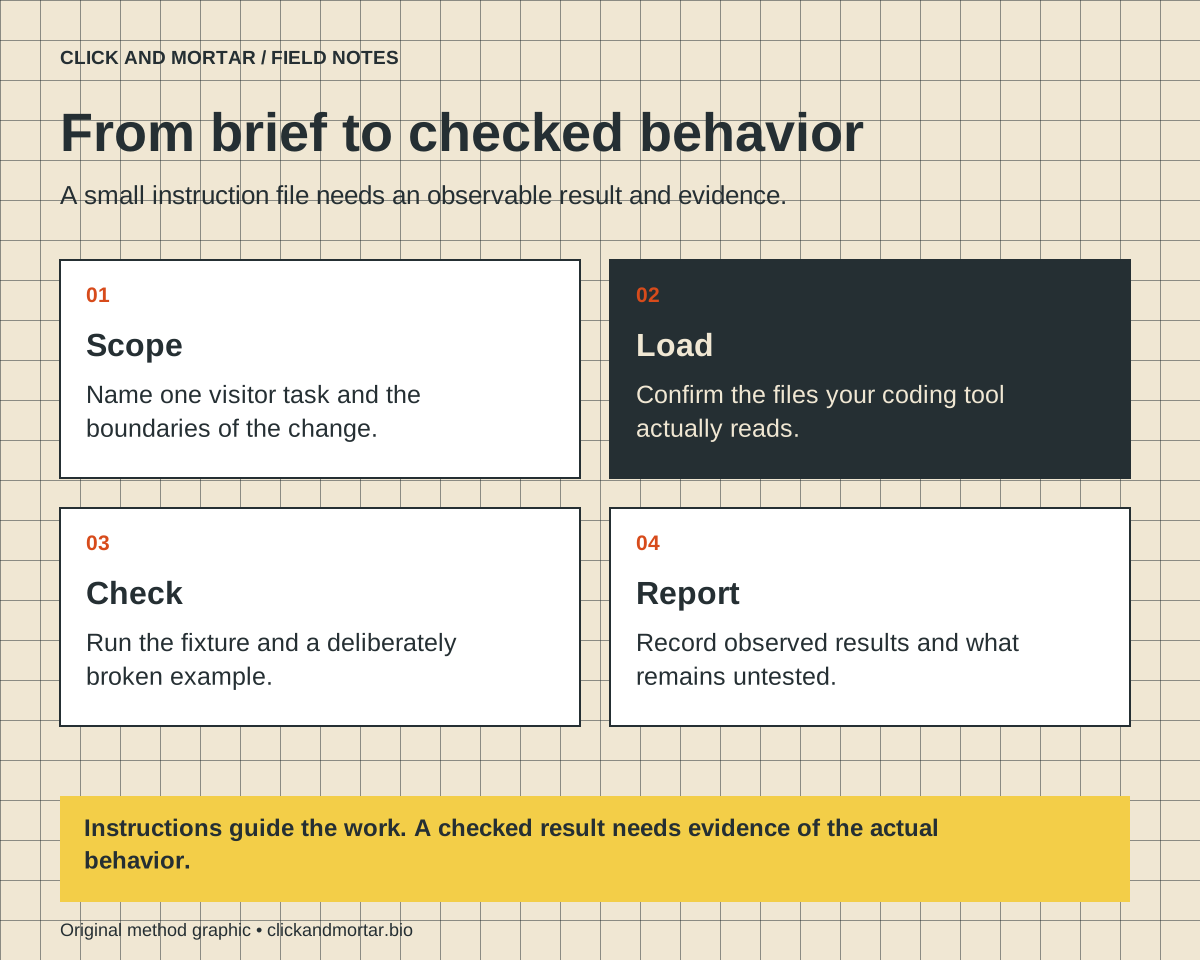
Useful project instructions connect the requested change to the files an agent should inspect, the behavior it must preserve and the evidence required before delivery. Start with a small shared brief, confirm that your coding tool loads it, and test one concrete visitor task. An instruction file guides work; executable checks and a reviewed release establish what actually happened.
Our own website workflow separates project instructions, editorial evidence and release checks. During the October 6 canonical-article correction, we compared the deployed HTML with the inspected package and recorded the live audit separately from the deployment command. Those are observations from this site, not proof that a prompt guarantees reliable work. The downloadable starter kit below is a new, deliberately small local example built to make that separation inspectable.
Start with one change a visitor can observe
“Make this website better” leaves the agent to invent both the work and the acceptance criteria. A useful brief names a visitor, a task and a limit. For example: update a studio homepage so its primary action opens the existing contact section, while keeping its wording and other destinations intact. That describes an observable result without authorizing an unrelated redesign.
Keep durable instructions separate from today’s request. The project file explains where content lives, which commands are real, and what must survive edits. The task brief describes this particular change. A dated evidence note records the outcome. Mixing all three into a growing wall of instructions makes it difficult to tell a current requirement from an old completed task.
For a commissioned website, ask your developer to show this connection: requested visitor behavior, responsible source file, relevant check, and actual result. You do not need to prescribe every implementation choice to ask for clear evidence. Our web-design service uses these kinds of scoped acceptance questions; the starter kit is a teaching example rather than a contract or universal workflow.
Confirm which instructions your tool actually reads
Codex documents an instruction chain built from global and project guidance. Its directory lookup gives AGENTS.override.md precedence over AGENTS.md at the same level; more specific project guidance can refine the broader instructions. A file with a different name is not automatically part of that discovery unless configured or explicitly read. Check the current tool documentation and the session’s reported instruction sources before relying on a rule.
Claude Code documents CLAUDE.md and, in supported versions and configurations, AGENTS.md discovery. Those rules are not identical to Codex’s. The starter kit includes a small CLAUDE.md importing @AGENTS.md so the shared example can be maintained in one place. Verify the loaded memory/instruction files in your actual session; an import written on disk is not evidence that every installed version loaded it.
We have checked the file references and runnable example locally. We have not benchmarked agent compliance or claimed identical behavior across tool versions. The release note should distinguish a vendor’s documented discovery behavior from a test you personally ran.
References: OpenAI: Custom instructions with AGENTS.md; Anthropic: How Claude remembers your project
Use the starter kit as a bounded example
The downloadable kit contains AGENTS.md, CLAUDE.md, a task brief, a static homepage and a dependency-free Node test. It deliberately has no hosting integration, forms that submit data, analytics, payment flow or third-party credentials. Unzip it into a new local folder and inspect every file before adapting it. Run node --test acceptance.test.mjs from that folder to check the example.
The shared instructions identify index.html as the single-page source, name the exact test command, preserve the contact address and navigation, and require a concise change report. The task brief asks for an anchor-based primary action rather than an invented booking integration. Replace example-specific facts with inspected project facts when adapting the kit; do not copy fictional contact details into a real release.
Download: /brand/editorial/project-instructions-for-ai-website-work-starter-kit.zip. This is a static teaching artifact. Its passing checks do not establish responsive quality, accessibility conformance, agent reliability or readiness for your production site. The readable files are included so you can change the example and inspect why a check fails.
| File | Purpose | Evidence to inspect |
|---|---|---|
| AGENTS.md | Shared project scope and boundaries | Real filenames and executable verification command |
| CLAUDE.md | Explicit shared-file import | Confirm loaded files in the actual tool session |
| TASK-BRIEF.md | One bounded visitor task | Acceptance criteria tied to that change |
| acceptance.test.mjs | Checks for this tiny fixture | Positive result and a deliberately broken-link failure |
References: Download the local instruction starter kit (ZIP)
Test whether your check can catch the mistake
A check that always passes adds ceremony without much information. In this example, the primary link must target the contact section, that section must exist, and the static page must retain one main heading and a viewport declaration. The checks inspect a tiny controlled fixture; they are not a general HTML validator. On a real application, use a browser test for rendered behavior and its actual component and routing system.
The validation procedure runs the unchanged fixture first, then runs a separate temporary copy with the contact target deliberately broken. The first must pass and the second must fail. The original fixture is preserved. This demonstrates that the specific test detects the specific link regression. It does not show that an AI will follow the brief, that all links work, or that the page is suitable for all assistive technologies.
Use the same idea in your own workflow: choose one plausible failure and establish whether your test detects it. Keep destructive experiments in disposable fixtures. Do not create real appointments, submit customer forms or send messages merely to make a checklist look complete. Record those integrations as untested until you have an authorized test method.
Instructions are not access controls
A sentence telling an agent to protect secrets is useful guidance, but it does not replace permissions, credential storage or review of what a tool can send. Keep tokens and private client facts out of downloadable templates. Describe the approved access route without embedding its contents. Grant only the access required for the actual task through the tool’s supported controls.
Likewise, a request to improve a page does not establish that a staging build is the production site. Our project instructions distinguish the active source checkout from saved staging material. The practical lesson is to name the intended target and verify it before a consequential action. A template should help locate that evidence; it should not silently authorize every future deployment.
When a login or uncertain result blocks one action, record that narrow dependency. Continue independent local drafting or verification where appropriate. Never label a queued request as delivered, and never resend an uncertain external action just because the first command did not return a convenient success message.
Finish with a short evidence-based handoff
A useful final report states the behavior changed, the checks performed and the remaining limits. For this kit, a good report would say that the primary action reaches the contact anchor in the static fixture, the fixture tests pass, and the negative example fails as expected. It would also say that production hosting and real contact delivery were outside the example.
This is different from our launch-review checklist, which examines a finished site, and our ownership article, which asks who can operate it. Here the deliverable is the instruction-and-test relationship before and during a small change. Keep that relationship compact enough for a new maintainer to inspect without reconstructing an entire chat history.
If you would like to try the method on a real project, bring one page and one behavior to the free learning call at /learn. Start with a change you can explain and observe. Add project-specific checks as you discover real failure modes, rather than collecting a large prompt file whose claims nobody verifies.
Common questions
Can I use one instruction file with Codex and Claude Code?
You can share the core content, but discovery and override behavior differ. The kit uses AGENTS.md plus an explicit CLAUDE.md import. Check your installed tool’s documentation and loaded sources; do not assume a filename alone guarantees identical behavior.
Does passing the starter-kit test prove an AI-built site is ready?
No. It checks a few properties of a small static fixture and demonstrates one deliberate regression. A real site needs checks for its actual routes, integrations, visual behavior and release target.
Sources and further reading
Primary references checked on October 9, 2026. Product claims belong to the cited provider; implementation recommendations reflect our judgment.
Field Notes / for developers
The next lesson, in your inbox.
A short, practical blurb for every new note, with a link to the full method. Web development, useful motion, automation, and lessons from AI-assisted builds. Up to three emails a week.
Developer notes, no sales sequence. Privacy · Prefer RSS?
Learn by building / with Tommy
Want a hand getting started?
If you want to get into AI web design or get better at vibe coding, I’d love to help you get started at no charge. Bring a project, a stuck prompt, or a question. I find I learn more by teaching others.
Book a free 30-minute learning callA practical conversation. No experience required.
AI assists research and drafting. Articles are checked for source support and clear distinctions between examples and verified work. Read our editorial policy. Suggest a correction.