
Form says success but no email arrived: trace the missing handoff
The practical answer
Find the last step you can prove completed: the saved inquiry, queued notification, provider acceptance, or recipient-server delivery. Recover from that point. A success screen does not prove an email arrived, and a timeout does not prove sending failed.
This diagnostic method draws on the inspected implementation of our own Field Notes newsletter: durable delivery records, provider IDs and a review state for uncertain sends. The inquiry incident below is illustrative, not a report of a lost client lead or a deployed brokerage CRM.
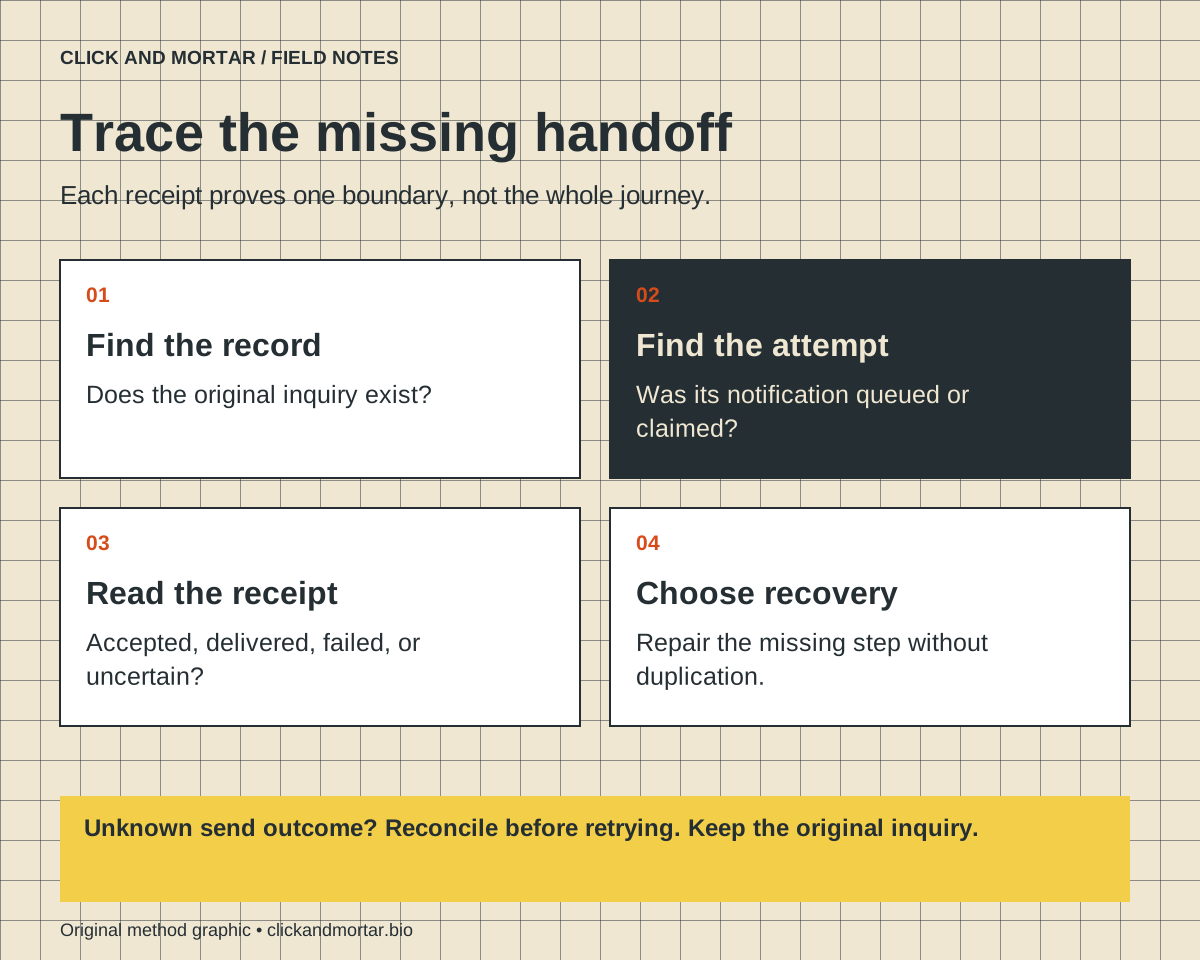
One inquiry, four different answers
Imagine a visitor requests information about a property. The page thanks them, but the assigned person sees no email. That report contains two observations: the visitor saw confirmation and the person did not find a message. Neither observation identifies which system needs repair. Rebuilding the form or pressing send repeatedly can make the incident harder to understand.
Write down the approximate time, the page, and a non-sensitive receipt identifier if available. Ask an authorized operator to locate the inquiry in the system of record. Keep contact details and message contents out of public debugging notes. If the inquiry exists, preserve it while investigating the next boundary. If it cannot be found, investigate the submission and storage path before the email path.
Check what the success screen actually means
A frontend can accidentally show success after any completed network response. MDN explains that fetch resolves even for HTTP error responses, so application code must inspect the response status. A resolved promise is therefore too weak a condition for a reassuring message.
Even an HTTP success status needs an agreed meaning. A response might mean a job was accepted for later processing rather than that an inquiry was committed to storage. Inspect the endpoint contract and returned receipt, then locate the matching record. The interface should describe the stage that actually completed. This is an implementation check, not evidence that every form on this site has that particular defect.
References: MDN: Using Fetch and checking response status
Use an evidence table before choosing a retry
Work from the earliest missing receipt toward the destination. The table below is a proposed incident worksheet. It separates a missing inquiry from a saved inquiry whose notification failed. Each row points to a different owner: the application developer, workflow operator, email provider or person responsible for follow-up.
Keep the original inquiry ID through the investigation and record what was checked. A generic label such as failed is not enough when one system may have completed work before another lost its acknowledgment. Avoid resolving the incident solely because a second test message arrived; the original request still needs an owner.
| Evidence found | What it establishes | Next check |
|---|---|---|
| No saved record located | Receipt is unverified | Inspect submission response and storage logs |
| Record saved; no notification attempt | Inquiry exists | Inspect queue creation and assignment |
| Attempt started; no provider receipt | Outcome is uncertain | Reconcile before sending again |
| Provider accepted the request | Sending request succeeded | Inspect subsequent delivery status |
| Recipient server accepted email | Server delivery occurred | Check authorized inbox rules and human ownership |
Provider acceptance, delivery and reading differ
Resend describes email.sent as the event following a successful API request; delivery to the recipient mail server is still attempted. Its delivered guidance explains that receiving-server acceptance does not determine where the message ultimately appears in the inbox. Filtering can put it elsewhere. Neither status confirms a human reply.
When provider delivery is established, investigate the agreed recipient address and authorized inbox filtering rather than replaying the entire inquiry. When delivery fails or is suppressed, inspect the reason and correct the permitted destination or workflow. Do not bypass an unsubscribe or suppression decision simply to make a dashboard look successful.
References: Resend: Successful sending event; Resend: Delivered email not received
Retry the operation you can identify
Resend retains idempotency keys for 24 hours. Within its supported behavior, repeating the same request with the same key can return the previous response without sending a second email. Treat that as a bounded provider guarantee, not permanent duplicate prevention. Keep your own durable delivery record for decisions after that window.
Before a replay, identify the original operation, whether its payload changed, and whether the provider can still deduplicate it. If acceptance remains unknown, leave it for reconciliation instead of inventing a new key. An operator decision should explain what evidence justified the retry and which record owns it. This makes recovery inspectable without promising that distributed systems cannot fail.
- Locate the original record and notification attempt.
- Check the latest provider receipt when available.
- Keep ambiguous outcomes separate from confirmed failures.
- Retry only under the provider contract and local duplicate controls.
- Confirm the original inquiry has a responsible human owner.
References: Resend: Idempotency keys and retention
Ask for a failure demonstration before handover
For a project review, request a short staging demonstration with an inbox your team controls: save an inquiry while notification is unavailable, lose a response after a simulated provider acceptance, and submit the same request twice. Agree expected records and visitor messages before the demonstration. The useful deliverable is the evidence from each case and a recovery owner, not a screenshot of a green success banner.
The existing real-estate lead-capture guide covers the overall handoff design, while our website launch-review guide covers broader release checks. This note adds the narrower incident decision: determine which acknowledgment is missing before retrying. If your team cannot trace a website request into a saved record and a follow-up owner, start a lead-automation scope review with that specific gap.
Common questions
Should I ask the visitor to submit the form again?
First look for the existing inquiry using an authorized receipt lookup. If it exists, recover the notification or ownership handoff instead of creating another lead. If no record can be established, provide a safe retry with duplicate protection or a verified alternative contact route.
Does an email marked delivered mean someone read it?
No. In Resend, delivered means the receiving mail server accepted the message. Inbox filtering and a person reading or answering it are separate steps.
Can this be checked without sending emails to real prospects?
Yes. Use a staging environment with simulated failures and an inbox your team controls. Inspect records and provider receipts for authorized test messages; never use an actual prospect list as the test fixture.
Sources and further reading
Primary references checked on September 16, 2026. Product claims belong to the cited provider; implementation recommendations reflect our judgment.
Field Notes / for developers
The next lesson, in your inbox.
A short, practical blurb for every new note, with a link to the full method. Web development, useful motion, automation, and lessons from AI-assisted builds. Up to three emails a week.
Developer notes, no sales sequence. Privacy · Prefer RSS?
Learn by building / with Tommy
Want a hand getting started?
If you want to get into AI web design or get better at vibe coding, I’d love to help you get started at no charge. Bring a project, a stuck prompt, or a question. I find I learn more by teaching others.
Book a free 30-minute learning callA practical conversation. No experience required.
AI assists research and drafting. Articles are checked for source support and clear distinctions between examples and verified work. Read our editorial policy. Suggest a correction.