How to automate lead capture on a real estate website
The practical answer
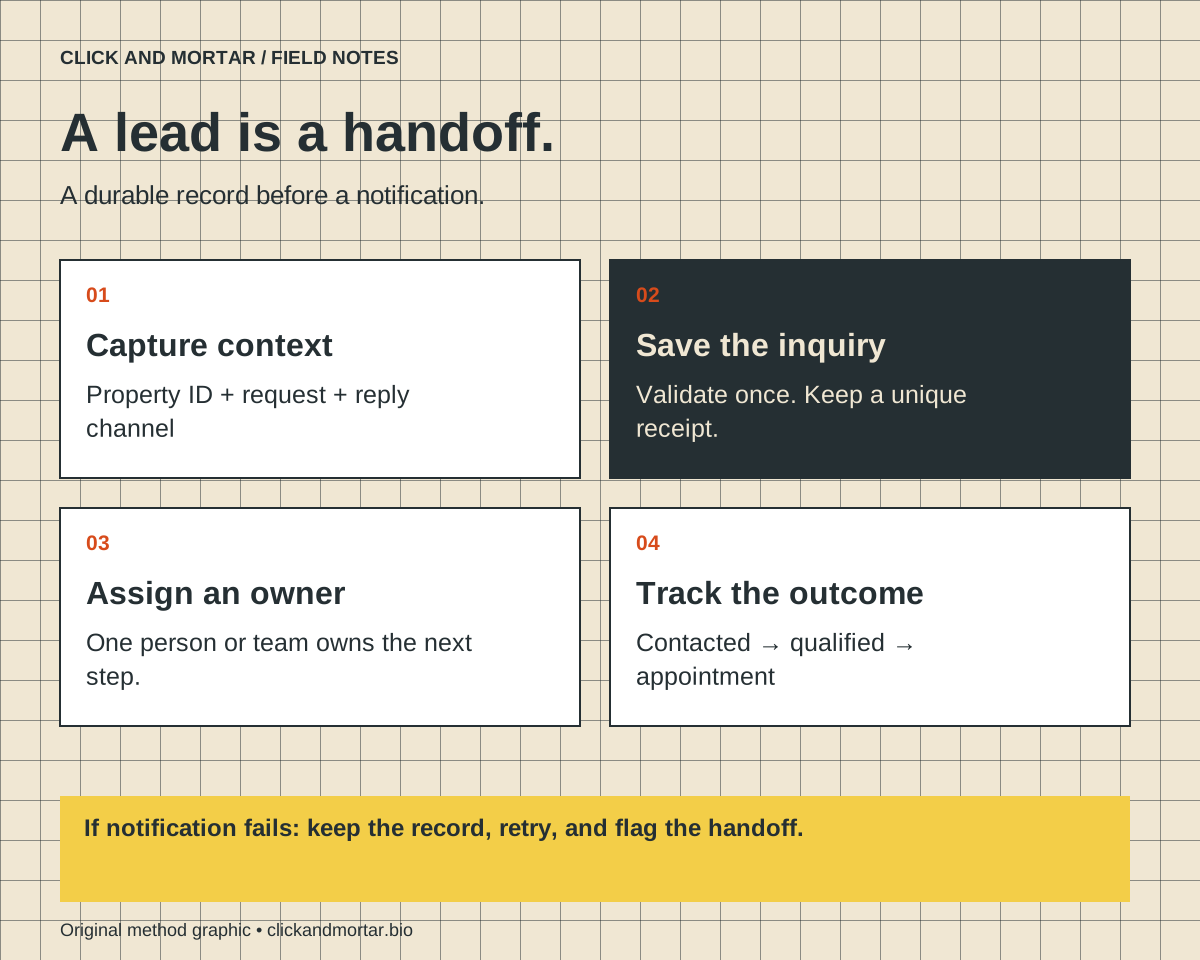
Connect each property inquiry to a durable record, a named owner, and a follow-up task. Save the inquiry before sending notifications, carry the property identifier through every step, and test failures as carefully as successful submissions.
A practical implementation blueprint informed by our website integration work. The example below is illustrative; it is not a claim that a particular brokerage uses this workflow or achieved a measured conversion increase.
Start with the handoff, not the form builder
A visitor on a listing page has already told you something useful: which property they are considering. A generic contact form often throws that context away. The agent receives a name and an email address, then has to ask what the person wanted. Automation should remove that avoidable step before it adds more messages.
Write down what happens after an inquiry. Who owns it? Where is it stored? What does the visitor see? What happens if that owner is unavailable? If these questions have no answer, connecting another tool will only move the uncertainty faster.
- Choose one primary action per listing: request availability, arrange a tour, or ask a property question.
- Assign a team or person to each inquiry type before launch.
- Agree on a response target your team can actually meet; do not advertise instant human responses unless you provide them.
Keep the form short and the context intact
For a tour inquiry, start with name, a reply channel, preferred timing, and an optional question. Add fields only when they change routing or help the team respond. A buyer asking about one listing should not need to complete a full qualification interview to make contact.
Attach a stable property ID and the page URL to the submission. Keep campaign attribution separately when your consent and measurement setup permits it. Treat hidden fields as visitor-supplied input: resolve the property ID against your own records and do not trust a submitted agent email address as the routing destination.
| Record | Why it matters |
|---|---|
| Inquiry ID | Connects storage, notifications, and follow-up without relying on an email subject. |
| Property ID and source page | Preserves the listing context and supports routing. |
| Contact details and request | Gives the assigned person enough information to reply. |
| Owner, status, and timestamps | Makes unassigned or overdue inquiries visible. |
References: W3C: Accessible forms tutorial
Save first, then notify
The reliable sequence is validate, save, queue notification, then confirm receipt. The database or CRM is the record of the inquiry. Email is a notification about that record. If sending an email fails, the inquiry should still exist and remain visible to the team.
Give each submission an idempotency key so a double tap or network retry does not create two leads. Validate fields on the server, set reasonable length limits, and rate-limit the endpoint. Add spam defenses that do not make the form unusable for keyboard or assistive-technology users.
Show success only after the server confirms storage. If the request fails, retain the visitor's entered text and provide a retry or another contact option. A reassuring animation is not evidence that the inquiry arrived.
- New inquiry → saved record → assigned owner → notification task.
- Notification failure → retry queue and visible error; keep the saved record.
- Duplicate submission → return the original receipt instead of creating another record.
References: OWASP: Input validation guidance
Automate the next task, not an invented relationship
An acknowledgment can confirm which property the inquiry concerns and describe the next step. Keep it separate from promotional messages. Avoid implying that a human reviewed the request when the message was generated automatically.
Create a follow-up task for the assigned person and an escalation for inquiries left unassigned. When the listing is unavailable, route the request for a relevant response instead of continuing a tour sequence for a property the team cannot show. Keep message permissions and retention choices aligned with your actual policies.
For example, an inquiry about Property A can create a New inquiry record, notify the responsible team, and become Contacted when a person replies. A later Tour arranged status should reflect a real appointment, not just a click on a calendar link.
Test the full journey and measure qualified outcomes
Test on a phone with a slow connection, submit twice, enter invalid contact details, and simulate an unavailable notification service. Confirm what appears in the CRM, who receives the task, and what the visitor sees. A successful browser message alone is not an end-to-end test.
Track the funnel from listing view to inquiry saved, qualified conversation, and appointment. Use aggregate measurements where possible and keep names, email addresses, phone numbers, and message contents out of analytics events. More form submissions are not automatically better leads.
Our working rule is simple: separate the visible interface from the evidence that an action completed. That same discipline matters for booking, checkout, client portals, and any other integration where the next person depends on an accurate record.
- Confirm a saved record exists for every displayed receipt.
- Confirm duplicate submissions do not create duplicate work.
- Confirm an unavailable listing and failed email have a defined recovery path.
- Review missed inquiries and qualified appointments, not only raw conversion counts.
References: Google Analytics: Avoid sending personally identifiable information
Common questions
Do I need a custom CRM to automate property inquiries?
No. Use the CRM your team already maintains if it supports reliable inquiry creation and assignment. Custom code is useful for missing routing or validation behavior, but it also needs an owner and ongoing maintenance.
Should every real estate lead receive an automated text?
No. Select a reply channel based on the visitor's request, your permissions, and the workflow your team can support. An automated acknowledgment and a promotional sequence serve different purposes.
Sources and further reading
Primary references checked on September 9, 2026. Product claims belong to the cited provider; implementation recommendations reflect our judgment.
Field Notes / for developers
The next lesson, in your inbox.
A short, practical blurb for every new note, with a link to the full method. Web development, useful motion, automation, and lessons from AI-assisted builds. Up to three emails a week.
Developer notes, no sales sequence. Privacy · Prefer RSS?
Learn by building / with Tommy
Want a hand getting started?
If you want to get into AI web design or get better at vibe coding, I’d love to help you get started at no charge. Bring a project, a stuck prompt, or a question. I find I learn more by teaching others.
Book a free 30-minute learning callA practical conversation. No experience required.
AI assists research and drafting. Articles are checked for source support and clear distinctions between examples and verified work. Read our editorial policy. Suggest a correction.